When “Take over” Doesn’t Give You Control
A cognitive ergonomics review of Hermes Bot Screen: five findings about human control, observation and state, reproduced and corrected before merge.
Imagine an agent working in a browser. It reaches a login that needs your intervention. You open its desktop, click “Take over” and start entering your credentials. What do you believe that click has given you?
You probably expect to use the interface without the agent continuing to click or read through another route. If your connection drops, you have not necessarily decided to hand control back. And if the screen is labelled live, you expect to be looking at its current state.
That illustrative situation captures the questions I examined in Bot Screen, a Hermes Agent feature that lets a person take control of the agent’s desktop and then return it. On 12 September, Teknium invited me to review it. I posted a human–agent interaction review with five findings and two design notes. He reproduced all five findings and documented their fixes. The feature was merged on 23 September.
The case is useful because a simple human action places requirements on several parts of the system. Taking control involves tool access, captures, connection handling and the state shown to the person.
Three questions behind a button
I approached the review as an ergonomist: what situation does the interface let a person understand, what actions remain possible, and what can they rely on as they continue their work?
Three questions guided the analysis. Who can actually act after the person takes over? What can the agent still observe? And what state does the person believe they are seeing?
I examined these questions using AI-assisted regression probes against real components, with test doubles at the boundaries specified in the review. This was a design review with probes, rather than a user study. The fixes and the reported live Xfce/noVNC checks were the maintainer’s work.
That division makes the contribution traceable: I formulated and documented the findings; the maintainer reproduced them, made corrections and reported his verification.
1. The browser still offered another route
Human takeover could block one action path while leaving the shared browser’s tools available. The agent could still read or act in that browser while the person held control.
From the person’s perspective, this is the same working environment. They have no reason to distinguish the tool driving the desktop from the one commanding the browser directly. Protecting only the first path does not give the button its expected meaning.
The documented correction applied the control check to the covered local browser commands and invalidated results across control changes. The maintainer reported that click and snapshot commands were refused during human control and navigation worked after hand-back.
The interaction question therefore led to an access path behind the visible interface. A person’s expectation about control had to hold across the tools sharing that browser.
2. A capture could span the whole intervention
The second problem concerned time. A capture could begin while the agent held control, span a human takeover and hand-back, then return when the agent held control again.
Checking only the holder at the end misses what happened between those states. The initial and final holder can be identical even though a person intervened in between. A simple “is the human holding control now?” check cannot detect that history.
The fix uses the control epoch: a result is discarded when the capture crosses a control transition. The system can account for the human interval even when that interval has already ended by the time the operation returns.
This is an important property of asynchronous interaction. The current state does not necessarily tell you which transitions an operation has crossed. A result can arrive at an apparently appropriate moment and still belong to a period that should invalidate it.
3. A dropped connection could count as hand-back
The viewer’s connection could fail during the human intervention. The reported behaviour then returned control to the agent, allowing it to resume during unfinished input.
A network failure tells you little about the person’s intention. They may still be working, trying to restore the view or simply wondering what happened. Treating the failure as a decision to resume assigns an intention they never expressed.
The maintainer’s response distinguishes normal closure from an unexpected disconnect. In the involuntary case he checked, the human exclusion remains in place. Losing the connection no longer suffices to restore the agent’s control.
Keeping that exclusion preserves a decision the person actually made. The runtime needs a rule for the broken connection, and that rule has a direct consequence for the interrupted human activity.
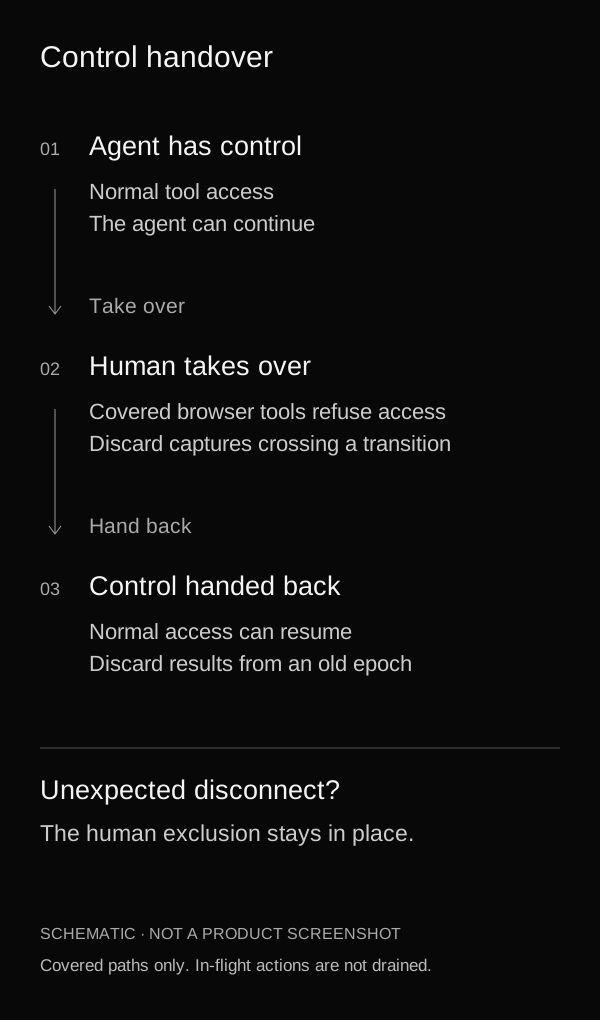
Schematic of the covered paths after correction, not a product screenshot. Actions already in flight are not drained; this mechanism does not provide operating-system isolation.
4. An old image could still look current
When refreshes failed, the interface could continue presenting the last image as live. The image was real; its apparent freshness was the problem.
A person may use that signal to decide whether to wait, intervene or assume the agent is still progressing. The age of the information affects the decision even when nothing looks unusual in the image itself.
The correction dims the frame after repeated failures and indicates that it is the last image seen, with the screen now unreachable. The retained information remains useful, accompanied by an indication of what it can support.
The review establishes a display problem, not an observed incident in which a user was misled. Its relevance is the decision the interface invites someone to make. State information includes its age and the conditions under which it was obtained.
5. An event could belong to the other host
Two hosts could use the same profile path. An event from one could then update the control state displayed for the other, because matching relied on that path alone.
The finding concerned an incorrect displayed state. It did not demonstrate video, cookies or keystrokes crossing between hosts.
The fix matches the connection identifier together with the profile to decide which screen an event belongs to. A person needs to associate a control indication with the correct environment, even when installations use similar names and paths.
For a product team, that gives a concrete review scenario: open two environments sharing names or paths, then examine where their events appear. The identity a backend uses to route an update has consequences for the environment a person believes they are controlling.
What the review establishes
In his public response, Teknium wrote: “Thanks @Julientalbot — every finding reproduced.” He then detailed the treatment of the five findings and the two design notes.
Those notes are a separate category. One concerned keeping the reason for the intervention available while the person acted. The associated handoff mechanism was removed in a later revision. Counting all seven points as seven shipped features would misrepresent the record.
The scope of control also remains specific. The maintainer retained the decision not to drain actions already in flight during takeover. Coordinating the covered tool paths does not create a security boundary between processes sharing an operating-system user.
These limits belong in an explanation of the feature. They keep a set of verifiable corrections from becoming a general promise of privacy.
An interaction review that reaches into the runtime
The review began with what a person can understand and do. It reached into tool access, capture timing, disconnect handling and environment identity.
For a team building an agent, a productive exercise is to take one important interface action and follow its consequences through the system. What should that action mean to the person? Which paths need to honour that meaning? What happens to it during a disconnection, a delay or a recovery?
Writing an interaction requirement does not implement the fix. It helps specify what the fix must achieve and gives the team a scenario against which to examine it. In this case, the requirements became concrete enough for the maintainer to reproduce the problems and document changes.
This is the kind of contribution I want to do more of: focused reviews, inspectable findings and recommendations discussed with the people building the product.
If you are developing a workflow involving delegation, supervision or human takeover, propose a feature for review. A useful starting point can be as simple as a button whose implications we want to examine together.